
Finding the right tool to collect search engine data can make a significant difference in how effectively you build applications, analyze competitors, or improve SEO strategies. A Scalable SERP api is often the backbone of these processes, helping developers and marketers access structured search results quickly and efficiently. But with so many options available, choosing the best Google Search API requires a clear understanding of features, performance, and real-world usability.
This guide breaks down what makes a Google Search API truly valuable and how you can select the right one for your needs.
What Is a Google Search API?
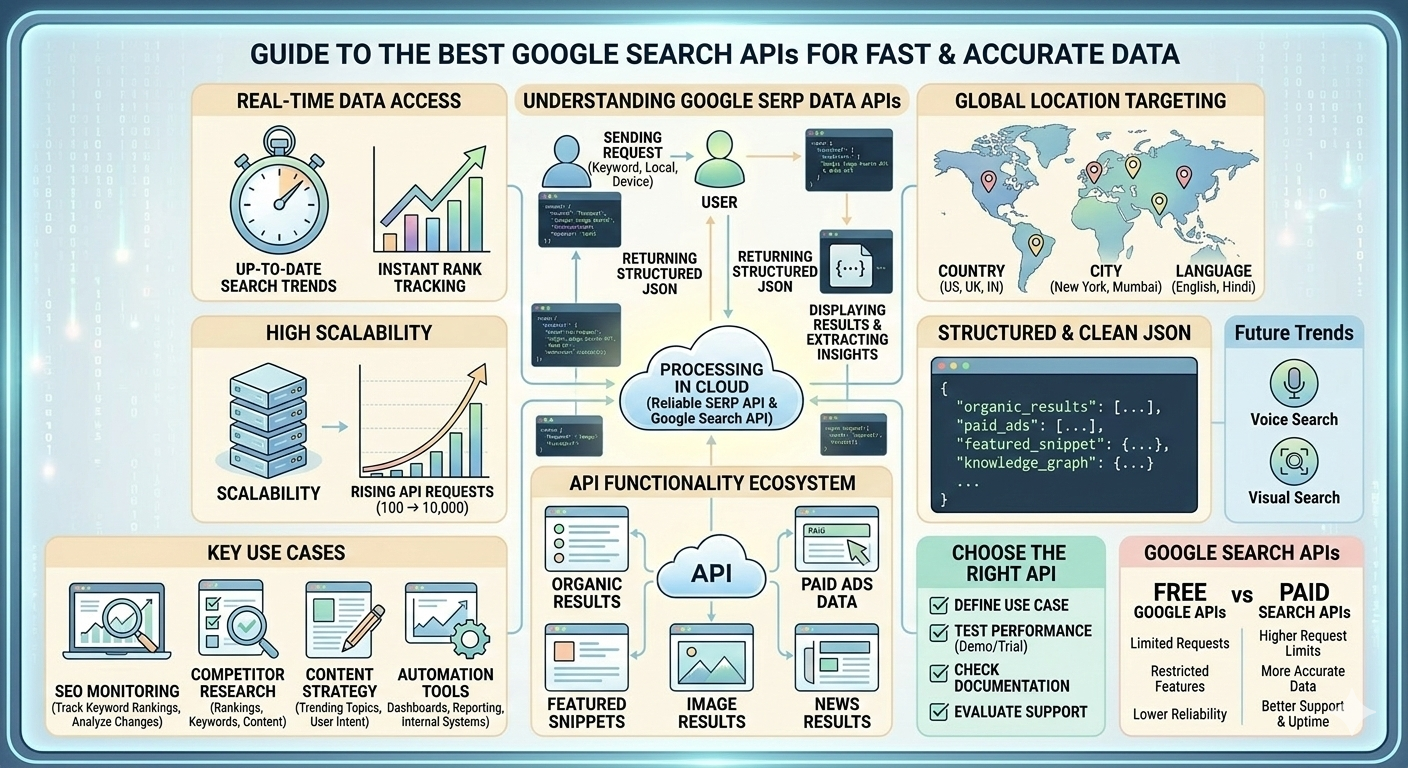
A Google Search API allows developers to retrieve search engine results programmatically. Instead of manually searching on Google, you can send a request to an API and receive structured data such as:
- Organic search results
- Paid ads data
- Featured snippets
- Knowledge graph information
- Image and news results
This automation is especially useful for SEO professionals, marketers, and developers who rely on real-time data to make decisions.
Why Fast and Accurate Data Matters
When working with search data, speed and accuracy are not optional. They directly impact:
- SEO performance tracking
- Competitor analysis
- Content optimization strategies
- Automation workflows
If your API is slow or delivers incomplete data, your entire strategy can suffer. Fast APIs ensure real-time insights, while accurate data helps you make confident decisions.
Key Features to Look for in the Best Google Search API
Choosing the right API is not just about price or popularity. You need to evaluate several critical features.
1. Real-Time Data Access
The best APIs deliver fresh results that closely match what users see on search engines. This is crucial for tracking rankings and trends.
2. High Scalability
Whether you are handling a few requests or thousands per day, the API should scale without performance issues.
3. Global Location Targeting
A good API allows you to simulate searches from different countries, cities, or devices, helping you understand localized search behavior.
4. Structured and Clean Data
Data should be easy to read and integrate into your systems. JSON format with clear fields is ideal.
5. Uptime and Reliability
Frequent downtime can disrupt workflows. Look for APIs with strong uptime guarantees.
6. Support for Multiple Search Types
The best tools go beyond web search and include:
- Image search
- News search
- Shopping results
Popular Use Cases of Google Search APIs
Understanding how these APIs are used can help you determine what features matter most.
SEO Monitoring
Track keyword rankings and analyze changes over time without manual effort.
Competitor Research
See how competitors rank, what keywords they target, and how their content performs.
Content Strategy
Identify trending topics, featured snippets, and user intent to create better content.
Automation Tools
Integrate search data into dashboards, reporting tools, or internal systems.
What Makes an API Truly Stand Out?
Not all APIs are built the same. Some may offer basic functionality, while others provide advanced features that improve efficiency and accuracy.
Performance and Speed
Fast response times are essential for real-time applications. Delays can slow down automation and analytics.
Data Accuracy
The API should replicate actual search engine results as closely as possible. Even small inaccuracies can lead to poor decisions.
Ease of Integration
A well-documented API saves time and reduces development effort.
Cost Efficiency
Pricing should match your usage. Flexible plans are ideal for both small businesses and large-scale operations.
Comparing Free vs Paid Google Search APIs
Many developers start with free APIs, but they often come with limitations.
Free APIs
- Limited requests per day
- Restricted features
- Lower reliability
Paid APIs
- Higher request limits
- More accurate data
- Better support and uptime
If you are building a serious application or running an SEO campaign, investing in a paid solution is usually the better choice.
How to Choose the Right API for Your Needs
Selecting the best API depends on your goals. Here are a few practical steps to guide your decision:
Define Your Use Case
Are you focusing on SEO, app development, or data analysis? Your use case will determine the features you need.
Test Performance
Always try a demo or trial version to evaluate speed and data quality.
Check Documentation
Clear and detailed documentation indicates a developer-friendly API.
Evaluate Support
Reliable customer support can save you time when issues arise.
Common Challenges and How to Overcome Them
Even with the best tools, you may encounter challenges.
Rate Limits
Some APIs restrict the number of requests. Choosing a scalable solution can help avoid this issue.
Data Inconsistency
Ensure the API provider updates data frequently to maintain accuracy.
Integration Complexity
Look for APIs with simple endpoints and clear examples to reduce development time.
Future Trends in Search APIs
Search APIs are evolving rapidly, driven by advancements in AI and automation.
AI-Powered Insights
Modern APIs are starting to include intelligent data analysis, helping users interpret results more effectively.
Voice and Visual Search
With the rise of voice assistants and image-based search, APIs are expanding beyond traditional text queries.
Enhanced Localization
More precise location targeting is becoming standard, allowing businesses to refine their strategies further.
Reliable SERP data api
When choosing a tool for long-term use, a Reliable SERP data api ensures consistent performance, accurate results, and minimal downtime. This reliability is essential for businesses that depend on search data for decision-making, automation, and growth.
Selecting the best Google Search API is not about picking the most popular option. It is about finding a solution that delivers fast, accurate, and scalable data tailored to your needs. Whether you are an SEO professional, developer, or marketer, the right API can streamline your workflow, improve insights, and help you stay ahead in a competitive environment.
Focus on performance, scalability, and ease of use, and you will be able to build smarter systems that rely on dependable search data.
FAQs
1. What is the main benefit of using a Google Search API?
A Google Search API allows you to automate the process of collecting search results, saving time and providing structured data for analysis and integration into applications.
2. Are free Google Search APIs good for professional use?
Free APIs can be useful for testing or small projects, but they often have limitations in terms of accuracy, speed, and request limits. Paid APIs are better suited for professional and scalable use.
3. How do I ensure the API provides accurate data?
Choose an API with strong reliability, frequent data updates, and positive user feedback. Testing the API before full integration is also a good practice.
Recommended Resources:-
The Best Free APIs to Use in 2025 for Your Business
Zenserp vs. Yandex Reverse Image Search: What's The Best?
 English
Join our community to interact with posts!