
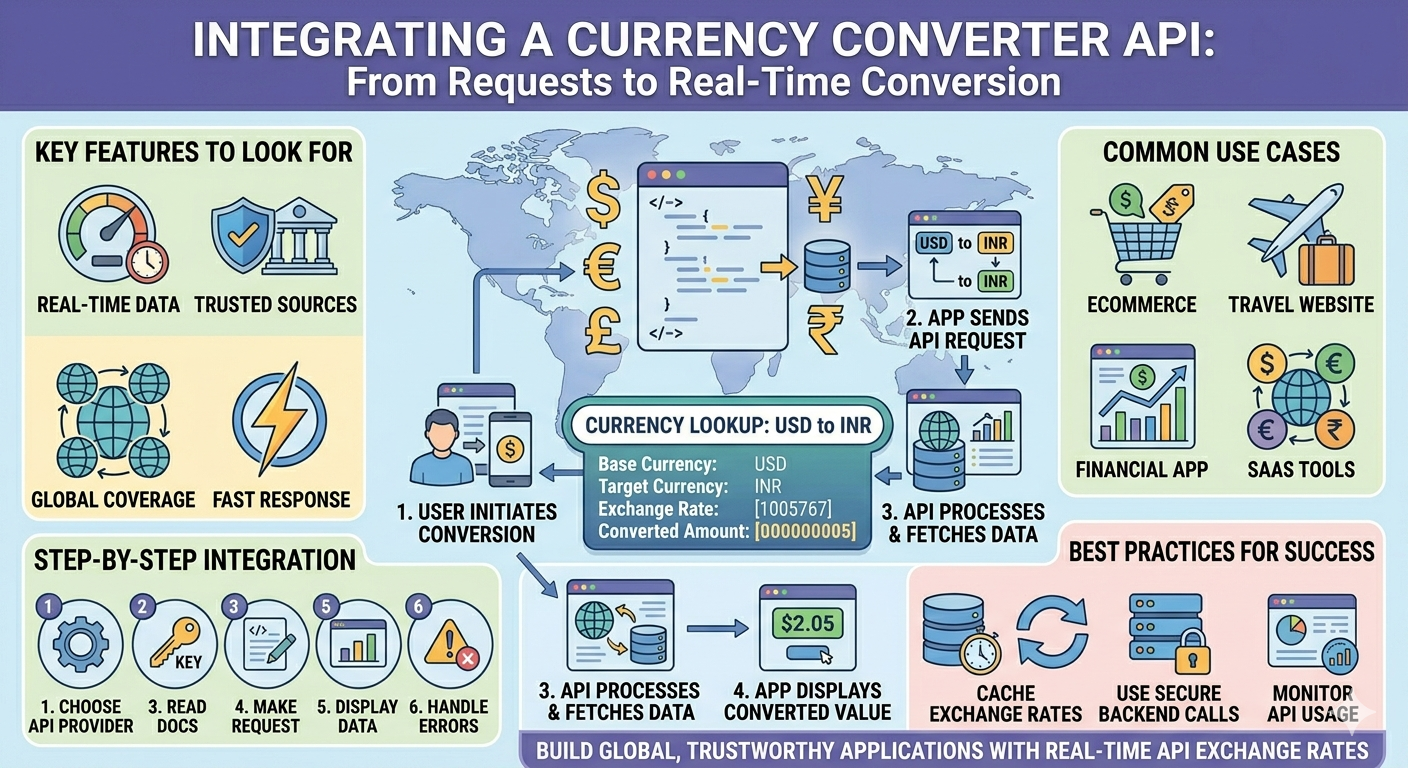
Integrating a api currency converter into your application can transform the way users interact with financial data. Whether you are building an ecommerce store, travel platform, fintech app, or SaaS product, real time currency conversion adds convenience, trust, and global usability.
In this guide, you will learn how currency converter APIs work, why they matter, and how you can integrate one step by step without complexity.
Why Currency Conversion Matters in Modern Applications
Users expect instant and accurate price conversions when browsing products or services across borders. If your platform serves international users, showing prices only in one currency can lead to confusion or even lost sales.
A currency converter API helps you:
- Display real time exchange values
- Improve user experience for global audiences
- Build trust with transparent pricing
- Automate financial calculations
Instead of manually updating exchange rates, APIs handle everything in the background, saving time and reducing errors.
What Is a Currency Converter API
A currency converter API is a service that provides exchange rate data between different currencies. It fetches updated rates from financial markets and delivers them to your application through simple requests.
These APIs typically return:
- Current exchange rates
- Historical data
- Currency symbols and codes
- Conversion calculations
With just one API call, your system can convert values from one currency to another instantly.
Key Features to Look For Before Integration
Not all APIs are the same. Choosing the right one is important for performance and reliability.
Here are a few essential features to consider:
- Real time data updates
- High accuracy and trusted sources
- Fast response time
- Global currency coverage
- Easy documentation and integration
- Secure API access with keys
A well designed API ensures your application runs smoothly without delays or inconsistencies.
How Currency Converter APIs Work
Understanding the workflow makes integration easier.
Here is a simple breakdown:
- Your application sends a request to the API
- The API processes the request using live financial data
- It returns the exchange rate or converted value
- Your app displays the result to users
For example, if a user wants to convert USD to INR, your app sends the request and receives the updated conversion instantly.
Step by Step Guide to Integrate a Currency Converter API
1. Choose the Right API Provider
Start by selecting a reliable provider that offers real time updates and clear documentation. Many platforms provide free and paid plans depending on your needs.
2. Get Your API Key
After signing up, you will receive an API key. This key is used to authenticate your requests.
Keep it secure and never expose it publicly in frontend code.
3. Read the Documentation
API documentation explains how to:
- Send requests
- Use endpoints
- Handle responses
Understanding this step saves time during development.
4. Make Your First API Request
Most APIs use simple HTTP requests. A basic request includes:
- Base currency
- Target currency
- Amount to convert
Once you send the request, the API responds with the conversion result.
5. Display Data in Your Application
After receiving the response, you can show:
- Converted price
- Exchange rate
- Currency symbol
Make sure the display is user friendly and easy to understand.
6. Handle Errors and Edge Cases
Always prepare for possible issues such as:
- API downtime
- Invalid currency codes
- Network errors
Add fallback messages or cached data to maintain a smooth user experience.
Best Practices for Smooth Integration
To ensure your integration works efficiently, follow these practices:
- Cache exchange rates to reduce API calls
- Update rates periodically instead of on every request
- Use secure backend calls for API requests
- Monitor API usage and limits
These small improvements can significantly enhance performance and reliability.
Use Cases of Currency Converter APIs
Currency APIs are widely used across industries. Here are some common examples:
Ecommerce Platforms
Show product prices in the user’s local currency to increase conversions.
Travel Websites
Help users compare hotel, flight, and package prices globally.
Financial Applications
Provide real time insights for trading, investment, and budgeting.
SaaS Tools
Support global billing and subscription management.
Common Challenges and How to Solve Them
Even though integration is simple, a few challenges may arise.
Data Accuracy
Choose APIs that source data from reliable financial institutions.
Rate Limits
Avoid exceeding API limits by caching data and optimizing requests.
Latency Issues
Use fast APIs with global servers to ensure quick responses.
By addressing these challenges early, you can build a stable and scalable solution.
How to Improve User Experience with Currency Conversion
Adding a currency converter is not just about functionality. It should enhance usability.
Here are a few tips:
- Auto detect user location and currency
- Allow manual currency selection
- Show both original and converted prices
- Keep UI clean and simple
A thoughtful design can make your platform feel more professional and user friendly.
Security Considerations
Security is an important part of API integration.
Make sure to:
- Store API keys securely
- Use HTTPS for all requests
- Avoid exposing sensitive data on the frontend
This protects your application and user data from potential risks.
Future Trends in Currency APIs
Currency APIs are evolving with technology. Some emerging trends include:
- AI driven financial predictions
- Blockchain based exchange data
- Faster real time processing
- Better accuracy with global coverage
Staying updated with these trends can give your application a competitive edge.
Integrating a currency converter API does not have to be complex. With the right approach, you can quickly add real time currency conversion to your application and improve user experience significantly.
By choosing a reliable provider, following best practices, and focusing on usability, you can build a feature that supports global users and drives better engagement. A well implemented api exchange rates solution ensures your platform remains accurate, efficient, and user friendly.
FAQs
1. How does a currency converter API get real time data
It collects exchange rates from financial markets, banks, and trusted data providers, then updates them frequently to ensure accuracy.
2. Can I use a currency API for free
Many providers offer free plans with limited requests. For larger applications, paid plans provide higher limits and better features.
3. Is it difficult to integrate a currency converter API
No, most APIs are developer friendly and require only basic HTTP requests. With proper documentation, integration can be completed quickly even by beginners.
Recommended Resources:-
12 Best Financial Market APIs for Real-Time Data in 2026
Top 12 Financial Data APIs for Real-Time Stock Market Insights in 2026
 English
Join our community to interact with posts!