
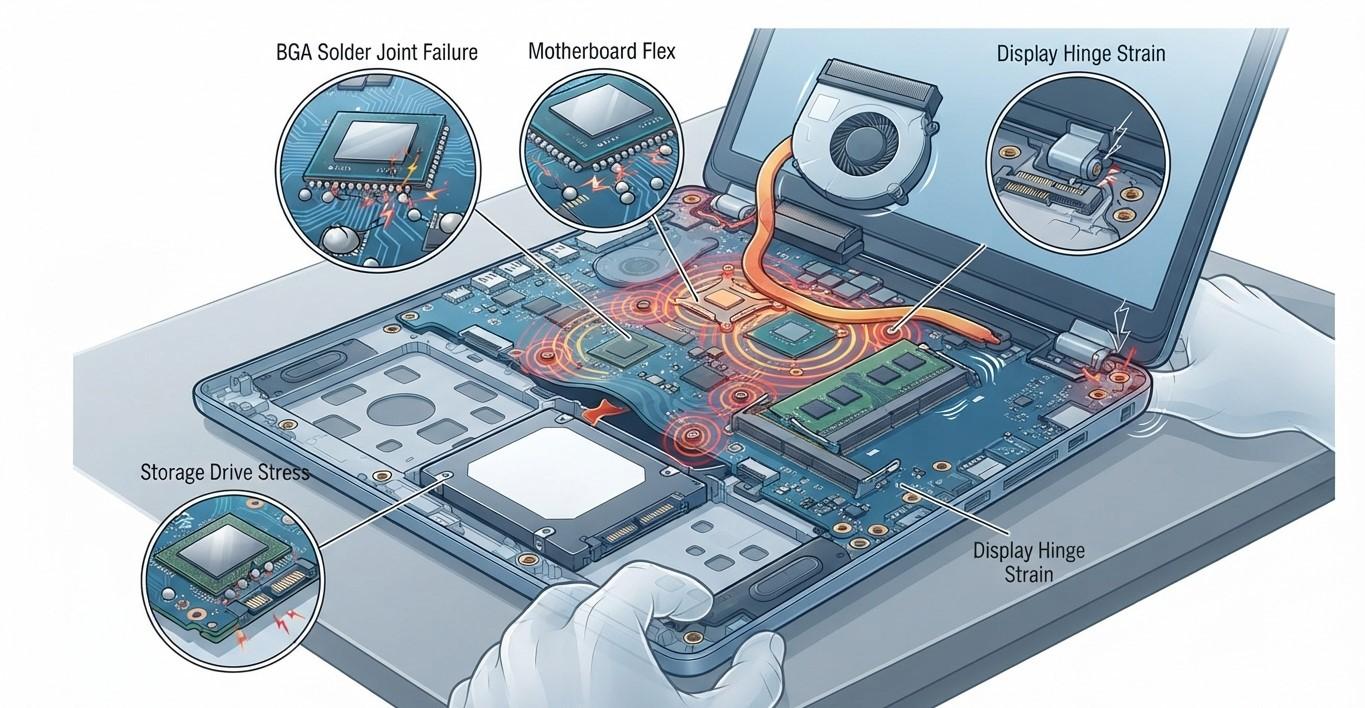
Laptops are designed to be portable, but frequent handling, transportation, opening and closing, and everyday movement can gradually place stress on internal hardware. Even when a laptop is never dropped, repeated bending, vibration, pressure, and movement may affect connectors, cables, hinges, storage devices, and other components over time. Understanding laptop handling stress prevention can help users reduce unnecessary wear and recognize early warning signs of internal hardware problems. At iPC Repair Houston, technicians can inspect laptops experiencing unusual behavior after prolonged daily handling. If movement-related issues affect the display, laptop screen repair Houston can help identify whether the problem involves the panel, cable, hinge, or internal connector. Customers searching for screen repair Houston TX can also request a broader hardware inspection.
Why Repeated Handling Matters
A laptop may appear sturdy on the outside, but its internal components are relatively compact and delicate.
Inside the device are:
- Motherboard circuits
- Display cables
- Battery connections
- Storage devices
- Cooling fans
- Memory modules
- Charging connectors
- Hinges and mounting points
Normal movement usually does not cause immediate damage. However, repeated physical stress over months or years can contribute to wear, especially if the laptop is frequently transported or handled roughly.
Opening and Closing the Lid
One of the most common forms of repeated laptop movement is opening and closing the display.
Every cycle places mechanical movement on the hinges and the surrounding display assembly.
Over time, worn hinges can become:
- Stiff
- Loose
- Noisy
- Difficult to move
A damaged hinge can also place pressure on nearby cables and the display frame.
Users should open and close the lid gently and avoid applying pressure to one corner.
Display Cables Can Experience Repeated Movement
The display connects to the motherboard through a cable that travels through the hinge area.
Because the cable must accommodate lid movement, it naturally experiences repeated flexing.
If the cable becomes worn or damaged, users may notice:
- Flickering
- Temporary black screens
- Intermittent image loss
- Lines across the display
- Brightness changes
These symptoms may appear only when the lid is moved to certain positions.
For laptop screen repair Houston, technicians can inspect the display panel, hinge area, display cable, and connectors to identify the source of the problem. Customers searching for screen repair Houston TX can also request a complete diagnostic when display symptoms occur alongside other hardware issues.
Transportation Can Increase Internal Stress
Carrying a laptop between home, school, work, or other locations exposes it to repeated movement.
Even inside a bag, the laptop may experience:
- Vibration
- Pressure
- Minor impacts
- Bending forces
- Contact with other objects
A poorly padded bag can increase these risks.
Using a protective laptop sleeve or padded compartment can help reduce the effect of everyday transportation.
Pressure Can Affect Internal Components
Placing pressure on a laptop can cause stress that extends beyond the outer casing.
For example, carrying a laptop under heavy books or tightly packed items can place pressure on the display assembly and chassis.
Potential problems include:
- Screen damage
- Hinge stress
- Chassis deformation
- Connector displacement
- Internal component damage
Avoid placing heavy objects on top of a laptop, even when the lid is closed.
Hard Drives Are Sensitive to Movement
Traditional mechanical hard drives contain moving parts.
Their internal platters spin while read/write heads move across the drive surface.
Repeated movement while the drive is actively operating can increase mechanical stress.
Users with mechanical storage should be particularly careful when moving the laptop during intensive disk activity.
Solid-state drives have no moving mechanical components, making them less vulnerable to movement-related mechanical wear.
Internal Connectors Can Become Less Reliable
Laptop components rely on connectors to communicate and receive power.
Repeated vibration or physical movement may contribute to connection problems, particularly when components or connectors are already aging.
Possible symptoms include:
- USB devices disconnecting
- Charging interruptions
- Keyboard problems
- Touchpad issues
- Storage detection failures
- Display interruptions
Intermittent symptoms can be difficult to diagnose because the laptop may appear normal most of the time.
Cooling Components Can Also Be Affected
Cooling fans contain moving parts and are already exposed to mechanical activity during normal operation.
Repeated transportation combined with dust accumulation can contribute to fan wear.
A damaged or worn fan may produce:
- Rattling
- Clicking
- Grinding sounds
- Increased vibration
- Higher temperatures
If unusual fan noise appears after years of frequent use, the cooling system should be inspected.
Battery and Power Connections Need Care
The battery connects to the motherboard through internal connectors.
Repeated physical movement, previous impact, or improper handling can potentially affect these connections.
Users may notice:
- Charging interruptions
- Unexpected shutdowns
- Battery detection problems
- Power fluctuations
These symptoms should be investigated rather than assuming the battery itself is defective.
How to Handle a Laptop More Safely
Several habits can reduce handling-related hardware stress.
Carry It With Proper Support
Use a padded laptop bag or sleeve designed to protect the device.
Avoid Carrying It by the Screen
Hold the base securely when moving the laptop.
Open the Lid From the Center
Opening the display evenly places less stress on the hinges.
Keep Heavy Objects Away
Never place books, bags, or other heavy items on the laptop.
Avoid Unnecessary Movement During Use
Keep the laptop on a stable surface whenever possible.
Handle Cables Carefully
Do not pull or twist charging and peripheral cables while they are connected.
Signs That Your Laptop Needs Inspection
Professional inspection may be appropriate if you notice:
- Display flickering
- New hinge noises
- Charging interruptions
- Random device disconnects
- Unusual fan vibration
- Storage errors
- Problems that appear after movement
- Intermittent hardware failures
At iPC Repair Houston, technicians can inspect internal cables, connectors, hinges, cooling components, storage devices, battery connections, and display hardware to identify potential problems.
Conclusion
Repeated laptop handling can gradually stress internal hardware through constant movement, vibration, pressure, lid operation, transportation, and cable flexing. Although individual movements may seem harmless, years of repeated handling can contribute to wear involving hinges, display cables, connectors, mechanical storage, cooling fans, and other components. Understanding laptop handling stress prevention can help users adopt safer habits and reduce unnecessary hardware strain. If handling-related problems affect the display, laptop screen repair Houston services can help determine whether the cause involves the screen panel, hinge, cable, connector, or another internal component. Customers searching for screen repair Houston TX can also request a comprehensive hardware inspection. With careful handling, proper protection, routine maintenance, and professional diagnostics from iPC Repair Houston, laptop users can help extend the reliability of their devices and reduce avoidable hardware problems.
 English
Join our community to interact with posts!